Showing posts with label D7000. Show all posts

Saturday, February 25, 2023

Nikon D7000 Shutter Life Expectancy

Since I've purchased the D7200, I wanted to tell the D7000.  I became curious as to how long it will keep working.  The shutter count is around 86,700.

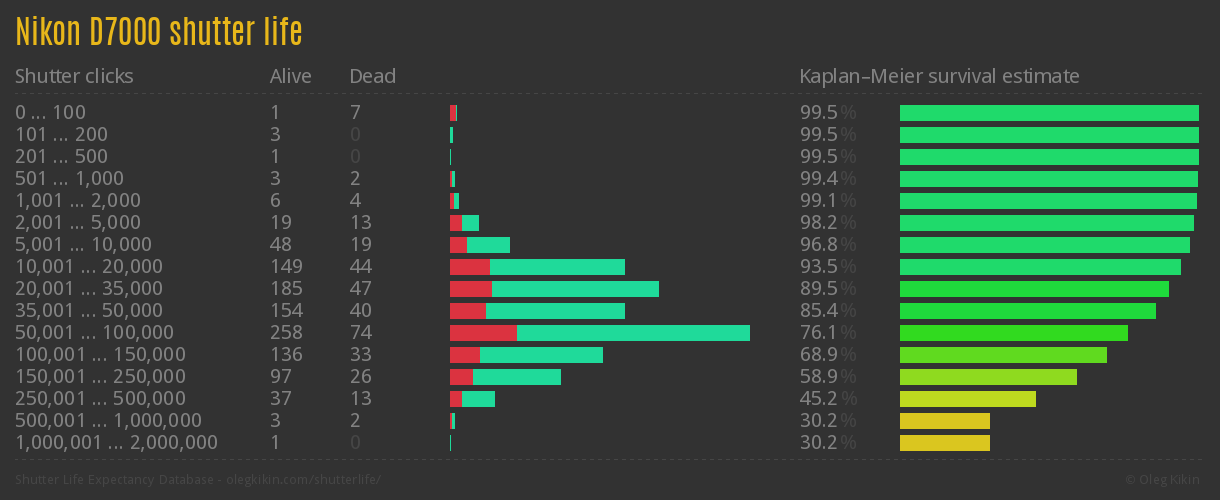
Here is a graph of actual shutter counts before a D7000 would die from https://www.olegkikin.com/shutterlife/nikon_d7000.htm:


So, the survival rate seems to drop drastically after 50,000 actuations.  Is my D7000 on its last leg?  There are a couple of cameras still going strong after 500K actuactions!  I'd be happy if mine reaches Nion's stated shutter life of 150K which appears to me like an overstatement if the estimated survival rate is only about 60%.


Sunday, February 12, 2012

D7000 back-focus problem

Nikkor 80-200mm f/2.8 ED AF-D
I have been using the D7000 for over a year and never thought of this problem.  After purchasing a Nikkor 80-200 f/2.8 AF-D, I realized the D7000 has been reported to have back-focus problems with this lens when shot with AF between 135-200mm through the viewfinder within a short distance from the subject.  The lens deliver tack sharp pictures and a nice bokeh.  Focus is spot on when focus is performed manually or through the D7000 live view--just not through the viewfinder.  Apparently, when live view is used, focus is performed using a contrast algorithm whereas when the viewfinder is used, focus is performed using some phase detection algorithm.  The D7000 has an AF Fine Tune control to correct these problems, but it does not help in the case of the 80-200mm lens however.  I set it to -20, the maximum setting for correcting back-focus problems, but it is not sufficient for the correction--see the picture below.  Rats.  Now, I wonder if I should sell it or just use it in manual mode or use live view.  The pictures do come out tack sharp!

Back-focus problem of D7000 with Nikkor 80-200mm:
"Hiding" is supposed to be the centre of focus.
Now, while I was already playing with the back-focus problem, I decided to test all my other lenses.  It looks like the Nikkor 18-200mm lens has a slight back-focus problem too.  It needs some AF Fine Tune adjustment of -8 or so on my D7000.

Tuesday, November 29, 2011

Nikon D7000's ISO levels

With the Nikon D7000, I rarely shoot at higher than ISO 800, but there are the odd times when you just need to push the limits of the camera.  I was in Ottawa this past weekend and ISO 1600 and ISO 3200 was the norm at night.  There was only one place I visited at night--Parliament Hill.  If I could, I would have visited Occupy Ottawa, I was told just east of Parliament Hill.

I did bring my tripod but the night I used it, it was so cold so I did not spend much time on the Hill.  The second night was warmer and was cloudy--great for photography by the way--but I forgot the bring the tripod along so it was all hand-held.  I also had my not-so-fast 18-200mm walkaround lens on.  With a not so great setup, I had to resort to pulling as much juice from the D7000 as possible.

So, hand held, these were some of the pictures I took with the D7000:

50mm, ISO 3200, f/4.8, 1/15 seconds:


18mm, ISO 1600, f/4.0, 1/6 seconds:


18mm, ISO 1600, f/4.5, 1/5 seconds:


18mm, ISO 1600, f/4.5, 1/4 seconds:

Sunday, October 30, 2011

D7000 mode dial, again

This darn problem has come back to bite me in the arse more than a couple of times now. It happened yesterday. I was shooting with my D7000 and SB900, in auto aperture mode when by accident I knocked the dial off position to manual mode. Because some time passed before I shot again in a darker area, I originally thought it was because of lighting. I was shooting slower than usually. I thought that was odd though, so after a handful of shots, I checked all my settings. True enough, this darn dial did bite me in the arse yet once more.

Again, I wished Nikon built the dial like the Canon--I'd send my camera in for a dial replacement any day.  (See:  Photon Farmers: D7000 mode dial)

Addendum:  After writing this blog, I found a solution that someone implemented using heat shrink tubing.  I do not have such tubing nor do I have gaffer tape that some other people suggested, so I will bear with the annoyance for now.  Here is the link for anyone interested in a DIY solution:  http://www.fredmiranda.com/forum/topic/1024765

Sunday, August 14, 2011

Solmeta GPS N1 for D7000, part 2

The GPS unit arrived on August 11, a couple of days before a BBQ.  It took under two weeks to arrive, faster than I expected.  The parcel was not shipped through China mail though.  It was through the Hong Kong post office.  Parcels do arrive in Canada faster when they are shipped out of Hong Kong.


Anyway, I got to play with the Solmeta for the first time yesterday at the BBQ event.  It was simple to use.  Just slide the main unit into the hotshoe flash mount, connect the USB cable to the unit, and connect the USB cable to the camera.  Now, interestingly, contrary to what I have read online, the USB end that connects to the camera is not so easily breakable.  It fits in very tightly.  I really have to apply a good amount force to plug it in and to pull it out--if the connector head is wet, it would be next to impossible to pull it out.


Once the GPS unit is connected up and turned on, it takes about a couple of minutes--I did not time it but it felt like a couple of minutes--to acquire satellite signals.  The LED at the top would blink as it tries to acquire signal, until it becomes solid when it is ready.  While the GPS unit is connected to the camera and is turned on, the top LCD on the D7000 displays "GPS"  beside the focus mode indicator.

When it is all ready to go, you just shoot and GPS information is recorded with the photo.  To view the GPS information, I would scroll through the photo detail screen as usual.  GPS information was now displayed along with the histogram, ISO, aperture, speed, etc.

Now, there was one annoying behaviour I observed but have not been able to reproduce after I returned home.  At the BBQ, with the GPS unit connected to the D7000, I was able to shoot like normal but then after a few shots, I was unable to half-press the shutter release button to focus.  As soon as I half-pressed the button, the camera took the shot right away so the pictures came out blurry.  Was it a problem with the GPS unit or with my possibly broken Nikkor 18-200mm lens?  To troubleshoot, I just removed the GPS unit and the shutter release button worked again as expected.  Something is funny about this GPS unit ... it could be because the USB cable was not fully inserted.


In the photo above, the camera fired away before the lens had a chance to focus as if it was shooting in manual mode.  This is a behaviour I have yet to reproduce.

Sunday, July 31, 2011

Solmeta GPS N1 for D7000

I decided I was not going to buy the PC-Mobile version after wall.  I decided instead to purchase a Solmeta GPS N1 unit for my D7000.  (It costed me $111 USD with free shipping, so I guess the unit is about $100 USD or so.)  The main reason for the Solmeta is the built-in battery.  While the other brands claim very low power draw, the built-in rechargeable battery of the Solmeta unit will power the GPS unit for up to 10 hours before it has to draw power from the camera.

When you order the unit from this eBay seller I bought it from, you need to specify the camera you are purchasing the GPS unit for.  They will then provide the right cable for that specific camera.  Hopefully, they will not send me a cable for another camera by mistake.

As you can see from the picture, there is a cable that fits the D7000--the CA7000.  This L-shape cable will not work well with the D90 but I figure I will be shooting with the D7000 most of the time.  If I do need to use the GPS unit for the D90, I would have to dangle the GPS unit off the strap eye socket on the camera.

This eBay seller offers a "free" gift--car charger or "wall plug" so the GPS unit can be recharged outside the camera.  I think it should not be a free gift.  It should be bundled with the package!  How else are you supposed to recharge the battery?  I chose the "wall plug" as I already have a car charger-to-AC adapter (I think).

Now, it's a 3-4 week wait.  It takes that long for shipment from China to arrive here in Canada.  Incredible.

Sunday, July 24, 2011

GPS for the D7000

I have done some research into the GPS unit for the D7000.  Apparently, the D7000 shares the same GPS connection plug as the D90 so I suppose I could buy a GPS unit for the D7000 and it will work on the D90 as well.  Sweet.

First though, I do not want to purchase the Nikon GP-1.  It is very expensive considering its limited functionality.  There are a number of third-party units:

Yongnuo N-918/N3 ($65)
Columbus nGPS ($90)
Phottix GPS Geo One ($160)
JYC N-769/N3 ($125)
Solmeta GPS N1 ($111)
Solmeta GPS Pro ($250)
PC-Mobile ($80)
Opteka GPN-1 ($85)

Now, I cannot buy the Yongnuo GPS unit yet.  The GPS port of the D7000, while the same as the D90, is reversed from the D90.  There is a notch on the D90 that points toward the front of the camera, while the notch on the D7000 points toward the back of the camera.  The Yongnuo GPS units were designed with an L-shape plug for the D90 so they fit well.  With the D7000, the cable may not be long enough because of the orientation of the plug, and because of the orientation, the cable points downwards and can cause the GPS port to break if not handled with care.

The Columbus nGPS could work.  It comes with a connection plug that is straight, but then, the cable would stick out too much and it would be easy to break the GPS port as well.

The JYC unit looks very similar to the Yongnuo.  Why the price difference, I wonder?  The only difference I can see is the connection plug.  The JYC has a straight plug vs. the L-shape plug of the Yongnuo.

The PC-Mobile GPS unit might work.  It has a connection plug that is modular.  It can be oriented up or down, depending on whether you use a D90 or a D7000.

The Phottix GPS unit looks very similar to the Nikon GP-1.  I have no idea whether the Phottix GPS unit will work though.  Again, it is a connection plug issue.  There are no images of the plug that I can find.

The Solmeta GPS N1 unit has a rechargeable battery.  Cool.  It has can come with a cable for either the D90 or the D7000.  You have to order one of the other.  I guess you could ask for two cables for an additional charges.

The Solmeta GPS  Pro unit is probably the best of the bunch in terms of functionality.  It even has an LCD display at the back that displays the current coordinates, date, time, and memory.  It has a rechargeable battery that can last for twenty hours--a real plus--so it does not draw power from the camera until the rechargeable battery is depleted!  As with the N1 version, it comes with one of a variety of cables.  You choose one.  The price is too high though.

The Opteka GPN-1 unit is claimed to work with the D7000 so it should work with the D90 as well.  However, I cannot find any image of the connection plug.

I am leaning toward getting the PC-Mobile GPS unit.  It is a simple device that can work with both the D90 and the D7000.
Tuesday, May 31, 2011

Nikon D7000 firmware 1.02

Nikon recently released a new firmware version 1.02 for the D7000. I just did the upgrade. It was quick and painless as usual. As with every firmware upgrade however, they always leave something to be desired. When I was using the D80, I wished they could have increased the delay timer after the shutter opens before the camera takes a picture from I think 0.4 seconds to a variable number. I believe Nikon said they would not do that. Now, with the D7000, I wished they could increase the auto exposure bracketing from 3 to 5 or 7 or 9. It's just a number! I believe Nikon is crippling the feature on purpose so consumers have to purchase a D300 (which I sold) or a D300s to get more professional-like features

Anyway, the firmware upgrade can be downloaded from Nikon Support.

Sunday, January 16, 2011

D7000

The D7000 is truly amazing. I have been shooting at ISO 3200 and pictures turned out great! In fact, one of my friends printed a photo I shot of his baby girl. I would not have known it was shot at ISO 3200 if I did not look at the photo EXIF data.

The D7000 is quite a camera but there is one design feature that just sucks. It is too easy to accidentally change the shooting mode dialer in the top left. If you don't pay attention to your settings you can easily shoot with the wrong settings for a whole batch of photos. It happened a couple of times already to me. This is the same problem I had with the D80. Why could Nikon not use the design of the D300 on the D7000 body!

Potensic Atom Follow-Me Mode

The Potensic Atom's Follow-Me mode is one of its "intelligent flight" modes.  It's a really nifty feature that uses visual...