So, it was not so final. Today, I thought I'd print the photo of Parliament Hill. The printing started out fine and then the printer refused to print black. I knew right away what to do this time around. I brought out the syringe, distilled water, and Windex. I have unclogged the black print head, but how could this be? It was printing fine then all of a sudden the whole black print head got clogged. Air bubbles or did the nozzles did get clogged up with old ink? The last time I used the printer was two weeks ago. I meant to run a print job once a week to keep the print nozzles free of gonk build-ups but got lazy last week. Well, I will try to run one print job once a week and see.
I would like to print from a laser printer but any wide format laser printer would set me back by $4000+. Too expensive for a hobby, unless I hit a 6/49 jackpot. For now, I will keep on battling with this inkjet printer.
Oh, I forgot to mention there are these nasty ink streaks. I think the print head is dirty. Other than that, the colours are coming out really nice. I am now printing at 1440dpi some flower I took on a trip to San Francisco a couple of years ago.
Showing posts with label Epson stylus 1280. Show all posts
Showing posts with label Epson stylus 1280. Show all posts
Saturday, December 3, 2011


Monday, November 14, 2011
Epson Stylus Photo 1280 woes, final
Success! All the yellow nozzles are firing and I made my three prints, after one week.
Sunday, November 13, 2011
Epson Stylus Photo 1280 woes, part 3

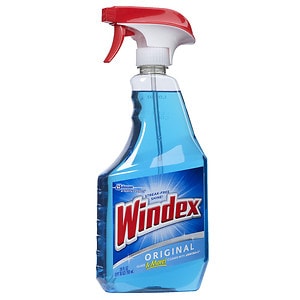
Searching on Google for unclogging Epson print nozzles will point to a number of solutions, including that damp paper towel method. Today, I used the Windex and distilled water approach. The approach calls for a solution of ammonia and water, so while I had my car serviced at Canadian Tire today, I went over to the PC Superstore (at Mavis and Dundas) and bought Windex ("Original" with Ammonia-D), a 4L bottle of distilled water, and a PeeDee Doe OralMed dispenser syringe for babies. With everything I needed, it was hard to contain my excitement--will it work??!!!! Like boys with toys, I prepared the simple solution, got the printer ready for a deep cleaning.
 Applying some pressure on the syringe to force the solution through the yellow needle, I ran it through five times followed by rinsing with just distilled water (to remove any Windex in the needle and cavity.) I turned on the printer, connected my notebook to it, and ran a print test. Nothing, no yellow printed. Back to deep cleaning a couple more times. Another print test. Nothing. Yellow was not coming out! Did the yellow piezoelectric element burn out or something got shorted because I injected the Windex solution into the ink cavity? Maybe the nozzle was still clogged up? But, I could see the Windex solution coming through the yellow nozzle as the paper towel I placed under the print head got wet. Something was not right though. I used the syringe to blow out any air bubble or ink that might be left inside the yellow needle and cavity. I also used the syringe to draw any air bubble or ink out of the needle. Surprisingly, no yellow ink came out. There was no yellow ink on the paper towel. Yellow ink did not get drawn from the cartridge!
I replaced the colour cartridge with a brand new one. One print test and bingo, the world turned once again. I did the yellow square print test. The square came out very yellow. That was good. There are still a few clogged yellow nozzles though. From the pattern test, I could see a couple of missing lines. Not 100% but much better than before!
P.S. For those interested in the design of the Epson print head, there are a couple of diagrams here: http://www.hardwaresecrets.com/article/178
P.P.S. Windex Original is blue with Ammonia-D. I am not sure if Ammonia-D is ammonia but it seems to work for some people.
Friday, November 11, 2011
Epson Stylus Photo 1280 woes, part 2
The saga continues. This is frustrating. The yellow ink is not coming out. Once or twice, I was able to print an image of a full yellow square but every other time I tried, lines of reddish colour would appear instead. I have tried the wet paper towel trick to clean the print head many many times and could see yellow ink transferred onto the paper towel but the darn thing is still clogged! This is a real pain. Only if I could remove the print head and soak it in hot water to dissolve everything!
Monday, November 7, 2011
Epson Stylus Photo 1280 woes
I spent nearly three hours yesterday trying to fix a problem with my Epson Stylus Photo 1280 printer. What was the problem? As everyone that owns an Epson knows, you should never leave your printer to collect dust for too long. In my case, I left it on my computer desk alone for a few months. When I first ran a pattern test yesterday, I knew right away I had a nightmare on my hands. The print nozzles have clogged up! So, I did what everyone does with their Epson--ran the head cleaning routine and reprinted the pattern test page. The first cleaning did little to the print head. Many of the lines in the pattern test were missing and the yellow was totally absent. Well, twenty head cleaning and pattern test printing later, some pattern lines were still missing and the yellow still absent. I gave up for the night but around midnight, I had to try something I read from somewhere.
I used a paper towel and folded it many times into a thick strip of half an inch wide (so it looks like a long rectangle), dampened it with hot water (I do not have distilled water), and placed the strip in the groove where the printer head assembly slides over. I then manually moved the print head assembly over the strip and allow the damp paper towel to dissolve and clean whatever was clogging the nozzles. After a dozen or so attempts, I started to see some yellow patches on the paper towel.
I was quite excited that I wanted to do a print test right away, but only to find out I was then out of ink. I have a stash of colour cartridges but none of the black cartridge left. So, I ordered twelve new black cartridges. I hope they will arrive in a couple of days so I can see if the cleaning worked! I am counting down the days now.
I have three photos to print on 11"x17" paper. I could take them to Kinko's with all the time I have wasted so far, but printing at home is more fun, somehow.
I used a paper towel and folded it many times into a thick strip of half an inch wide (so it looks like a long rectangle), dampened it with hot water (I do not have distilled water), and placed the strip in the groove where the printer head assembly slides over. I then manually moved the print head assembly over the strip and allow the damp paper towel to dissolve and clean whatever was clogging the nozzles. After a dozen or so attempts, I started to see some yellow patches on the paper towel.
I was quite excited that I wanted to do a print test right away, but only to find out I was then out of ink. I have a stash of colour cartridges but none of the black cartridge left. So, I ordered twelve new black cartridges. I hope they will arrive in a couple of days so I can see if the cleaning worked! I am counting down the days now.
I have three photos to print on 11"x17" paper. I could take them to Kinko's with all the time I have wasted so far, but printing at home is more fun, somehow.
Sunday, March 13, 2011
Cleaning the print head of the Epson Stylus 1280
The following is from a website at http://www.retouchpro.com/forums/hardware/7324-problem-getting-quality-prints.html
The original article came from http://www.inkjetmall.com/store/cone_ts/cleaning.htm
I am quoting it here just in case the website goes down:
The original article came from http://www.inkjetmall.com/store/cone_ts/cleaning.htm
I am quoting it here just in case the website goes down:
DRIPS OF EXCESS INK ON THE PAPER DURING PRINTING
(cleaning the underside of the printhead, printhead cap)
In general, paper dust and lint accumulate on the bottom of the print head and in the print head cap.
NOTE: Paper towels are made with many levels of quality. Some really fall apart when wet and this type is not recommended. There are many possible substitutions here, for example, you could use photo wipes, lint free cloths etc. We tend to have rolls of paper towels available next to the printer, and an ink sogged paper towel can be thrown away easily. Use common sense, and what ever material you think best. Some people have reported success using a foam paint stick to scrub under the print head, and these can be cleaned after use. Use your ingenuity.
PROCEDURE - TO CLEAN OFF THE BOTTOM OF THE PRINT HEAD
SMALLER DESKTOP PRINTERS (760, 800, 850, 860, 1160, 1200 ETC.)
1 - Press paper button for 4 seconds, the print head should be to the left.
Note: Some printers have a special button for this purpose.
2 - Pull power cord
3 - Tear paper towel in 1/2. (A full sheet is too thick when folded).
4 - Fold paper towel and lay it in the black plastic channel below where the print head travels back and forth.
5 - Work the print head up over the paper towel (We are doing this on a dry paper towel so we can get the print head over it about an inch or two.)
6 - When the print head is up on the paper towel, squirt some Windex on the paper towel, and then move the printhead back and forth to scrub off the bottom.
7 - Move the print head off the towel, pull the towel up and get everything cleaned up.
8 - Push the print head over to the right parked position.
9 - Plug in the printer and turn it on.
10 - Print the nozzle check and do a couple cleaning cycles as required to get any paper towel fibers off the bottom of the print head. They clean right up - and are worth it because you have removed any large buildups from the bottom of the print head.
Epson Stylus 1280
The saga continues. As it turns out, the paper size I bought for these two rather large frames was a tiny bit too small. The frame needs something like 11.5". I really should have bought 13"x19" paper (which is really hard to find on eBay Canada) but it is a minor issue. The bigger issue is the black streaks I see on the printouts. I started looking around for possible reasons and some suggested that the sponge inside the printer used for cleaning the print head may be too full of ink. I checked the sponge and indeed it is full of ink. I used some kleenex tissue to dab on the sponge to dry it. Before my next print, I will perform a print head cleaning and we will see how it goes then.
Sunday, March 6, 2011
Good prints from the Epson Stylus 1280
The colour banding was starting to eat away my mind. I kept on thinking about it the whole week. How could this printer produce such low quality photos when some cheap commodity inkjets can print photos without banding? I decided to do one more print, onto glossy paper. This time, I looked closely at the colour bands and noticed it was really just the blueish parts of the photo that suffers from colour banding. The green was completely fine and so was black. Also, the blue colour banding seems to be a result of some missing pixels, so it appears like bands.
I had to run through the nozzle check utility to see a pixel is missing from the blue ink. Sure enough in the blue/pink ink, there were a couple of lines missing from the nozzle test. A good nozzle test should look like the following:

I decided then to waste some ink and run the nozzle cleaning utility. I had to do this twice to get a perfect nozzle test. Once the nozzle test shows a perfect print, I then retried some more photo prints on glossy paper.
In the printer printing preference menu, I selected to print on Glossy Photo Paper and chose a custom DPI of 1440. I am not sure if 720dpi would have been fine but so far, the prints came out nearly perfect. It was nearly perfect because close to the two shorter edges, there were a streak mark. I'm not sure where that comes from yet but I have seen it in every print I have made so far--I guess something is dirty. However, at least, there is no more banding! Woohoo!
I am now printing onto the 11"x17" glossy paper--the primary reason I bought this printer, for $90 by the way--of a beach scene I took in Costa Rica a couple of years ago. The print is coming out fine.
For my own information, before I print next time, I should always run through the nozzle check first. The nozzle check does not waste ink. It prints just a few lines using all the print heads for inspection.
I had to run through the nozzle check utility to see a pixel is missing from the blue ink. Sure enough in the blue/pink ink, there were a couple of lines missing from the nozzle test. A good nozzle test should look like the following:

I decided then to waste some ink and run the nozzle cleaning utility. I had to do this twice to get a perfect nozzle test. Once the nozzle test shows a perfect print, I then retried some more photo prints on glossy paper.
In the printer printing preference menu, I selected to print on Glossy Photo Paper and chose a custom DPI of 1440. I am not sure if 720dpi would have been fine but so far, the prints came out nearly perfect. It was nearly perfect because close to the two shorter edges, there were a streak mark. I'm not sure where that comes from yet but I have seen it in every print I have made so far--I guess something is dirty. However, at least, there is no more banding! Woohoo!
I am now printing onto the 11"x17" glossy paper--the primary reason I bought this printer, for $90 by the way--of a beach scene I took in Costa Rica a couple of years ago. The print is coming out fine.
For my own information, before I print next time, I should always run through the nozzle check first. The nozzle check does not waste ink. It prints just a few lines using all the print heads for inspection.
Sunday, February 27, 2011
First print from Epson compatible ink
Well, I used the new Epson Stylus 1280 compatible ink I purchased from http://www.123inkcartridges.ca/ with Epson premium glossy paper. I ran the nozzle head cleaning utility once. I could see it was clogged up prior to the cleaning. After cleaning, the light blue head was still not fully clean--all the colours came out fine except for the light blue. I decided to go ahead with a print job of a flower I took in 2007 with my D80 anyway.
The colour rendition is superb with the compatible ink. All the colours came through vibrant and sharp. The glossy paper makes for a nice photo quality touch. From a couple of feet away, the photo looks flawless. The only problem, if I were to pixel-peep from a foot away, is that I can see is the banding (and remember this is on premium glossy paper) and some black streaks. I have a feeling that the banding is caused by the black ink print head or the dpi resolution (currently set at 720dpi).
The colour rendition is superb with the compatible ink. All the colours came through vibrant and sharp. The glossy paper makes for a nice photo quality touch. From a couple of feet away, the photo looks flawless. The only problem, if I were to pixel-peep from a foot away, is that I can see is the banding (and remember this is on premium glossy paper) and some black streaks. I have a feeling that the banding is caused by the black ink print head or the dpi resolution (currently set at 720dpi).
Saturday, February 26, 2011
First prints from the Epson Stylus 1280
I finally printed my first five photos on this Epson Stylus 1280 using the original Epson ink cartridges. The first two photos were printed on Epson glossy 4"x6" photo paper. I was expecting a perfect print. The colours came out superb but the photos were far from perfect. I could clearly see colour banding (I think I see blue banding more than any other colour) and the print head skipped one line of pixels too. Maybe the print nozzles are slightly clogged up? In any case, I thought I'd see those bands only on plain paper. I thought glossy photo paper would fix that problem, but it does not appear to.
I then tried Epson matte 8.5"x11" paper. Same thing. Bands of colours are obvious. Maybe it's because I did not choose the right settings when printing?
For the glossy paper, I chose glossy photo paper type and even chose quality printing vs. high speed printing. (I also selected to borderless printing which worked great by the way.)
For the matte paper, I chose the heavyweight matte paper type but here I chose high speed printing.
For what I use these photos for though, I'm ok with the quality. If the photos are for a wedding, well, that's another story.
I then tried Epson matte 8.5"x11" paper. Same thing. Bands of colours are obvious. Maybe it's because I did not choose the right settings when printing?
For the glossy paper, I chose glossy photo paper type and even chose quality printing vs. high speed printing. (I also selected to borderless printing which worked great by the way.)
For the matte paper, I chose the heavyweight matte paper type but here I chose high speed printing.
For what I use these photos for though, I'm ok with the quality. If the photos are for a wedding, well, that's another story.
Monday, February 21, 2011
Epson Stylus 1280
Well, despite what I have read online, I went ahead with a purchase of a wide carriage Epson Stylus 1280 printer from someone on Craigslist. It was cheap. The problem that many people have reported was how much ink this printer will suck out of the ink cartridges and how frequently the print head will clog up--if you don't use the printer for a couple of weeks, expect the print head to clog up. We will see.
I have a wide carriage printer. Now I need to find some wide format photo glossy/matte paper. More shopping on the way...
Oh, and with the purchase, I also got a stack of games (e.g. Ultima, Age of Empire, some Atari games, a bunch of kids games) and software (OS, Office, CAD, etc.) that I will probably never use.
I have a wide carriage printer. Now I need to find some wide format photo glossy/matte paper. More shopping on the way...
Oh, and with the purchase, I also got a stack of games (e.g. Ultima, Age of Empire, some Atari games, a bunch of kids games) and software (OS, Office, CAD, etc.) that I will probably never use.
Subscribe to:
Posts (Atom)
Potensic Atom Follow-Me Mode
The Potensic Atom's Follow-Me mode is one of its "intelligent flight" modes. It's a really nifty feature that uses visual...
-
A local Zellers store is having liquidation sales of everything in the store. I was browsing through some electronics the other day--not pl...
-
So I decided that I will do an experiment. I will offer a few free photography shoots in my area for small events. I will see if the quali...
-
 I am starting to get used to shoot with a 50mm alone. For a long time, I have always trusted my Nikkor 18-200mm f/3.5-5.6 VR lens. I would...