Showing posts with label sensor cleaning. Show all posts

Saturday, February 25, 2023

Cleaning the Sensor

While I wouldn't touch the focusing screen again, cleaning the sensor is still something I'd do on a periodic basis.  If you use your DSLR on a regular basis, there is no escaping from getting dust on the sensor.  (To be more specific, it's not the sensor you'd be cleaning.  It's the sensor filter in front of the actual sensor and shutter.)  I think it's something everyone that shoots on a regular basis need to learn to
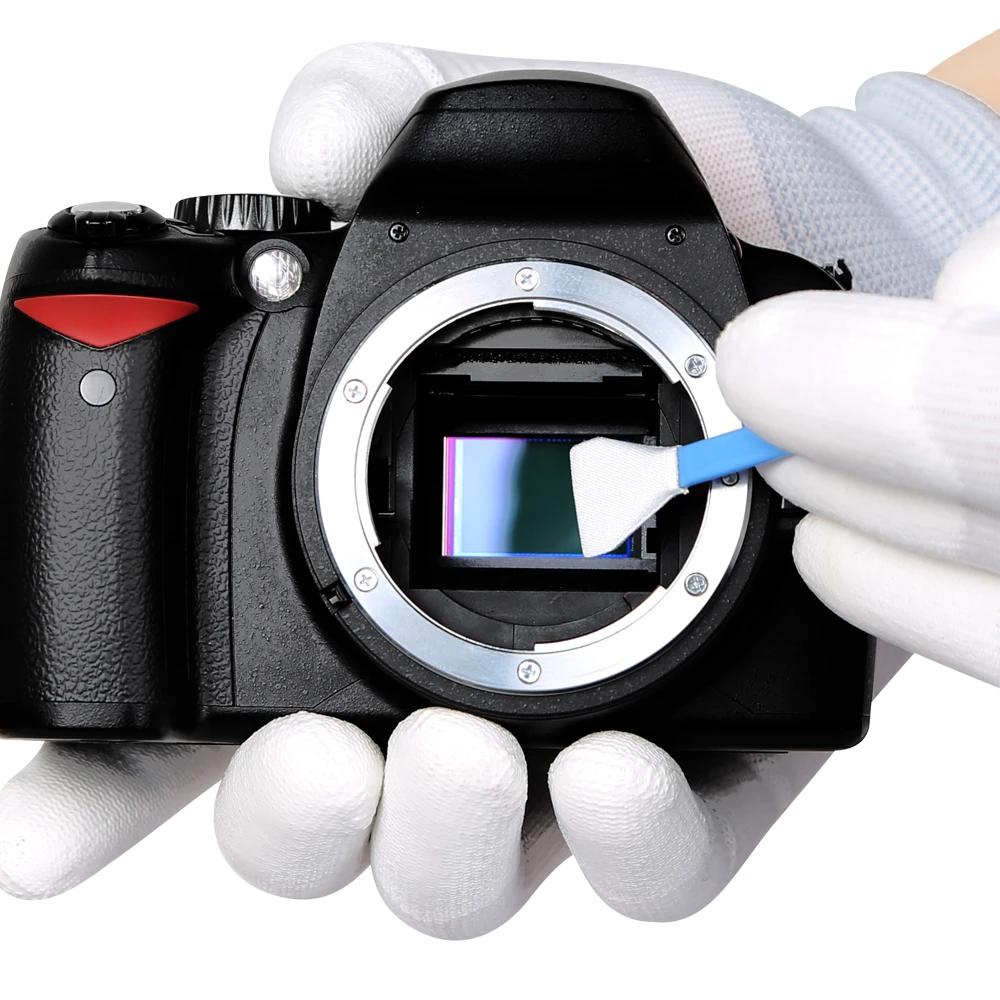

do.  Sure, you can send the camera to a shop to have it cleaned but it's really an easy and quick job.  There are many good YouTube videos that show you how to do this but the tools you'd need are as follows:

  1. For dry cleaning:
    1. Use an air blower first.  You can get one from Amazon:  https://amzn.to/3xU0TAI 
    2. If there is still dust, use a statically charged brush.  I bought a Visible Dust brush:  https://amzn.to/3IWGm4R 
    3. I haven't tried a cheaper alternative to the Visible Dust brush but this could work equally well:  https://amzn.to/3SxdpiV
  2. Wet cleaning:
    1. If the dry cleaning methods don't work, the dust bunnies are bonded to the sensor filter.  You'd have to rely on a wet cleaning method.  This kit on Amazon works well:  https://amzn.to/41ozrse

For wet cleaning, you don't need to fear much about touching the sensor filter.  The swabs are very soft and are lint free.  Being lint free is so important--don't even think of using a cotton swab to clean your sensor!

Dust bunnies will sometimes ruin your pictures so it's important that to do regular maintenance of the sensor.

Monday, April 21, 2014

Sensor cleaning nightmare


When you are in trouble, you know it.  It happened to me yesterday as I was trying to perform yet another wet cleaning operation on my D7000 sensor.  It started with the nasty field of bunnies on the right.

I was taking some pictures at f/14 and can clearly see some bunny spots in the blue sky.  That was annoying, so I had to look at the sensor.  It was dirty alright and for some reason, the bunnies were concentrating in the far right of the sensor as you can see here.  They were visible with the naked eyes.  I did not need to use the SensorKlear Loupe I purchased from the photo show a couple of years ago--btw, I highly recommend this loupe if you are doing any cleaning with your sensor.

Blowing air did nothing to remove the bunnies.  They were bonded to the sensor.  I did not try to Artic Butterfly and instead went straight to wet cleaning.  That's when things went kinda downhill.

On the first pass, the Pec Pad removed most of the bunnies but at the same time left streaks on the sensor.  The VisibleDust cleaning solution left residues behind as it dried.  The streaks were all over the sensor and even without the SensorKlear Loupe, I was able to see the streaks very clearly with my naked eyes.  So, I grabbed another Pec Pad and cleaned the sensor once more.  Again, streaks all over.  I tried yet once more.  Same results.  I knew it was not dust but residues from the solution.  Does the solution have an expiry date?  Maybe the alcohol has evaporated?  I really don't know but I must have tried cleaning the sensor five more times before I could get a clear sensor.

BTW, my sensor has this halo ring in the lower left corner.  It looks permanent to me as I see it in the other shots I took a couple of years ago.  Darn it.

Sunday, October 14, 2012

Sensor cleaning, nasty bunny

After the Henry's Exposure 2012 show, I decided to perform a wet cleaning on my sensor.

While I was at the show, I had my lens cleaned at this one booth for free (and they gave away a free Lenspen FilterKleaner.)  I did not know they would try to clean my sensor as well.  Well, they did.  They showed me their 6x magnification loupe with built-in LEDs.  The loupe is actually pretty cool.  It has an opening for a special lens pen to be inserted to clean the sensor.

Crop of image:  a persistent blob on my sensor!
I knew my sensor was probably dirty.  I hadn't cleaned it for a while and I have taken my camera to many dusty places and have switched lenses many times over.  So, I was not surprised to see tiny dust bunnies through the loupe.  They went to clean my sensor and I was really hoping it'd actually work, but unfortunately not.  The pen they used only smeared the dust bunnies and might have added more dust or some kind of residues from the cleaning tip.  After a couple of minutes, I told them "it's ok ... I'll do a wet cleaning." :-)  I'm sure they appreciated that.

Anyways, I went out to buy the Pec Pad sheets I mentioned a few months ago from Vistek.  The 100 sheets of Pec Pad came out to $14.68, including tax.  Each sheet can be cut in half and each half can be used two or three times by adjusting the sheet to use different parts of it--I used each half only twice.  This was the Copper Hill method.

With the Pec Pad sheets, I performed the cleaning four times.  There was one dust bunny that persists.  I still cannot clean it.  It appears in the lower left corner of the image, so on the sensor (looking from the front) it should be in the upper right corner.  I scrubbed the area a few times over but the dust hangs on.  I think I will get a loupe to take a closer look at the sensor.

UPDATE:  I ended up ordering a cheap 7x loupe from eBay.  The loupe has six LEDs.  With it, I'll be able to see what that dust bunny is.  I hope it's not between the sensor filter and the sensor itself!

Sunday, June 3, 2012

Pec-Pad for sensor wet cleaning

After reading many articles on the web about the Pec-Pad wipes, I am convinced the Sensor Swabs used to perform web cleaning of the CCD/CMOS sensors are just way over-priced.  Pec-Pad wipes will do and have done very well cleaning sensors over many years.  I just started using the Copper Hill method a week ago, and I am quite pleased with the result.  While I cannot recommend it to anyone, because of liability issues, I will certainly keep on using it for my own cleaning.  (Sending my camera in to Nikon for wet cleaning will easily set me back $50, and that's not yet including shipping and handling charges.)

The oddest things I found though ... I cannot find the Pec-Pad wipes on Henry's website.  In fact, there are only two sources for Pec-Pad wipes I can find in Canada:  on amazon.ca and at Vistek's.  The Pec-Pad 100 4x4 package sold through amazon.ca would cost me over $20 including tax and shipping.  I will just drop by Vistek's to pick one up for about $15 including tax.

It really sucks if you live too far away from a major city and would have to order these items online in Canada, but it sure beats $50 and time lost leaving your camera with Nikon.  If you follow the Copper Hill method however, just know it's not sanctioned by Nikon/Canon, so do so at your own risk.

Sunday, May 27, 2012

Copper Hill Sensor Swipe

The Henry's Exposure Show is now over.  I attended the show yesterday for about five hours.  It was good.  I walked out of the show with two Copper Hill Sensor Swipe kits for wet sensor cleaning, that I purchased for $2 each from Henry's clearance section (Henry's used to sell them for $25 each!!).

A Copper Hill Sensor Swipe kit comes with an 18mm swab and a PecPad sheet.  The PecPad sheet was wrapped around the swab ready for use out of the bag, and the 18mm width of the swab was perfect for the D7000 sensor as it covers pretty the entire height of the sensor.  I used my old sensor cleaning solution I bought from Aden Camera a while ago and applied a few drops onto the PedPad.  One swipe across the sensor almost did the job--my dust bunnies were well bonded to the surface.  I had to repeat the process one more time to get a perfectly clean sensor.  (The process involved swiping across the sensor with one side of the PecPad, and then go back (or go over in the same direction) with the other side of the PecPad.)

On the second attempt, because you are not supposed to be re-using the same side of the PecPad, I decided to unwrap the PecPad and reposition the swab at a different location on the PecPad.  It occurred to me then that the PecPad is held together with tape.  Uh, yeah, tape.  Well, that was stupid I thought.  Now, I can no longer use a whole section of the PecPad covered by the tape because of potential adhesive debris left on the PecPad.  What I could do though now, is to use the other side of the PecPad and cut the PecPad into disposable strips.

I will not follow the steps given on the instruction sheet that came with the kit.  Instead, on Copper Hill's website, there are these better instructions:  http://www.copperhillimages.com/index.php?pr=Tutorials2.  Basically, you cut the PecPad into strips.  After an application, throw the strips away.

http://www.copperhillimages.com/images/StripPrep.jpg

Sunday, November 20, 2011

Dust bunnies

Oh my goodness!  The bunnies are back with a vengeance!  I don't remember when I last operated my camera with multiple lenses outdoors--it might have been during the hike up around the Forks of the Credit--but my sensor is full of dust bunnies.  I had no need to take my camera out but since I will be heading to Ottawa next weekend, I thought I'd bring my D7000 along and thought I'd check the sensor now.  I got the Tamron 17-50mm lens on, set the aperture to f/32, and shot away at my bright notebook screen.  Two test shots confirmed it--btw, the blur was intentional.  No fewer than 40 bunnies have made my sensor their home.  They are concentrated in the right side of the photo for some reason.  Well, it's time to clear the field of the invaders.


So, it took me six attempts to clean the sensor to remove most of the bunnies.  I started with a blower.  I knew it was not going to do much if anything.  I then proceeded with the Artic Butterfly.  Sure enough, it looks like these bunnies have burrowed themselves deep into the sensor.  I then tried the wet cleaning method.  My first attempt with a used swab left some bunnies behind.  My second attempt with the used swab made it worse.  I threw away the swab and got another one, new this time.  I applied the swab across the sensor and it looked like it was perfectly clean--except that when I did my test shot there were these funny artifacts and I thought there were residues of the cleaning solution on the sensor.  So I did two more wet cleaning only to realize the funny artifacts are flares from the lens.  The sensor is not 100% clean but good enough for normal shooting.

Having the tools at home is a heck lot faster and more convenient than sending the camera in to Nikon for cleaning.  Did I tell you their service centre in Mississauga does not open late on weeknights and is closed on weekends.

Wednesday, January 26, 2011

Sensor cleaning

So, after a trip down to Ecuador, my D7000 needed some cleaning. I did not realize how much dust came into contact with the low pass filter. It was dirty! I tried my trusty Artic Buttefly to wipe the dust away but to no avail. It only smeared the dust spots even more. I gave up on the Butterfly and decided it needed a wet cleaning. I was going to take it to a store or to Nikon to have it cleaned. I read somewhere that Nikon would clean it for about $80. Know however that Nikon would give one complimentary cleaning within the first 31 days of your purchase of the camera, but unfortunately, I've had my camera for about two months already. I could have taken my camera to Vistek and they will clean it for $30-40 I believe.

Either that or you can do it yourself. I have the swabs for wet cleaning but had no more of the cleaning solution so I went to Aden Camera the other day and got myself a $25 tiny little bottle from Visible Dust. It's expensive but then again, you need only a couple of drops per job. So, I figured it costed me maybe about $2 for this cleaning job I just performed.

Saturday, June 20, 2009

Artic Butterfly, or not?

I have used Visible Dust's Artic Butterfly many times over. It worked flawlessly, always as expected ... until a couple of days ago.

Returning from a camping trip, I decided to clean my sensor for this weekend of dragonboat festival at the Toronto Centre Island. I was confident the Artic Butterfly will remove a couple of annoying specks of dust on my sensor.

Here was the before-cleaning shot:


After brushing across the screen once, here is what I got:


Yikes! I brushed across the screen a second time, and a third time. The gunk was stuck firm on the sensor filter!


I believe the edges of the sensor was very dirty. I must have touched the edge and dragged the dust or some other gunk across the sensor filter. It was horrific! I could even see the streaks of dust or other deposit on the sensor filter with the naked eye. Well, it was ruined I thought. I guess only Nikon Service could fix this mess. That meant lots of wasted time and trying to make it to their office before they close at 5pm or something like that. Just then, I remember Cesar had bought a wet cleaning kit.

Cesar's wet cleaning solution is called "ultrapure optic cleaning fluid" made by American Recorder. A few drops on the swab and a couple of swipes across the sensor filter removed most of the gunk, and another couple more swipes to remove all the gunk. A strand of the swab or dust got left behind on the right edge of the screen after the wet cleaning. I then used the Artic Butterfly to remove it.

After the first application of wet cleaning (still some dusts):


After a second application of the web cleaning and then the Artic Butterfly:

Sunday, May 4, 2008

Artic Butterfly, part 2

Today, I returned to the Toronto Photographic and Imaging Show at the International Centre by the airport. I had one thing in mind: get the Air Butterfly brush. Which one though? There are two versions: 724 and SL700. The 724 costs $30 more than the SL700. Which one to buy? In photography, you usually get what you pay for, so there is probably something about the 724 that speaks for the extra $30. After chatting with the technician, this is what I found out.

First, the brush for either the 724 or the SL700 is good for 10,000 uses. Second, the 724 brush is replaceable while the SL700 brush is not. Third, the 724 brush needs about 20 seconds of spinning to get ionized -- it does have two batteries so it spins faster than the SL700. The SL700 brush needs about 40 seconds of spinning, although the instructions say to spin it 5 seconds three times. I think I will go with the 40 seconds of spinning. Besides these two differences, the 724 and the SL700 are the same.

I bought the SL700 because it is rare that I will need to clean my sensor, and because I do not need to replace the brush for another 9999 uses. Mine looks like the one in the photo above but light green (green handle and green case).

To clean my sensor was simple, and it seemed to work fine. Here is what I did:
  • Replace my D80 battery with a fully charged battery
  • Remove the lens
  • Select the mirror lock-up option in the D80 menu -- btw, the lock-up option is available only if the camera thinks the battery has enough juice
  • Press the shutter button once to flip the mirror up and lock it in that position
  • Leave the camera on
  • Turn on the Artic Butterfly for 40 seconds
  • Turn off the Artic Butterfly
  • (At this point, if you want to be extra careful, remove the battery from the Artic Butterfly)
  • I brushed the sensor in one smooth motion in one direction
  • The bristles covered most of the surface of the sensor and that seemed to be good enough to pick up all the dust
  • Turn off the camera to close the mirror
  • Put the lens back on
  • Turn on the Artic Butterfly for 20 seconds to free the dust particles it picked up
  • Turn off the Artic Butterfly, and put the cap back on
My sensor is dust free!

Potensic Atom Follow-Me Mode

The Potensic Atom's Follow-Me mode is one of its "intelligent flight" modes.  It's a really nifty feature that uses visual...