So, it was not so final. Today, I thought I'd print the photo of Parliament Hill. The printing started out fine and then the printer refused to print black. I knew right away what to do this time around. I brought out the syringe, distilled water, and Windex. I have unclogged the black print head, but how could this be? It was printing fine then all of a sudden the whole black print head got clogged. Air bubbles or did the nozzles did get clogged up with old ink? The last time I used the printer was two weeks ago. I meant to run a print job once a week to keep the print nozzles free of gonk build-ups but got lazy last week. Well, I will try to run one print job once a week and see.
I would like to print from a laser printer but any wide format laser printer would set me back by $4000+. Too expensive for a hobby, unless I hit a 6/49 jackpot. For now, I will keep on battling with this inkjet printer.
Oh, I forgot to mention there are these nasty ink streaks. I think the print head is dirty. Other than that, the colours are coming out really nice. I am now printing at 1440dpi some flower I took on a trip to San Francisco a couple of years ago.
Showing posts with label clogged print head. Show all posts
Showing posts with label clogged print head. Show all posts
Saturday, December 3, 2011


Monday, November 14, 2011
Epson Stylus Photo 1280 woes, final
Success! All the yellow nozzles are firing and I made my three prints, after one week.
Sunday, November 13, 2011
Epson Stylus Photo 1280 woes, part 3

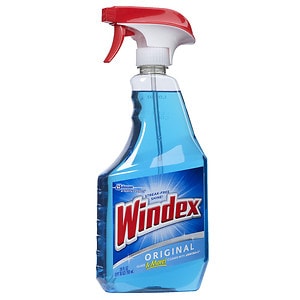
Searching on Google for unclogging Epson print nozzles will point to a number of solutions, including that damp paper towel method. Today, I used the Windex and distilled water approach. The approach calls for a solution of ammonia and water, so while I had my car serviced at Canadian Tire today, I went over to the PC Superstore (at Mavis and Dundas) and bought Windex ("Original" with Ammonia-D), a 4L bottle of distilled water, and a PeeDee Doe OralMed dispenser syringe for babies. With everything I needed, it was hard to contain my excitement--will it work??!!!! Like boys with toys, I prepared the simple solution, got the printer ready for a deep cleaning.
 Applying some pressure on the syringe to force the solution through the yellow needle, I ran it through five times followed by rinsing with just distilled water (to remove any Windex in the needle and cavity.) I turned on the printer, connected my notebook to it, and ran a print test. Nothing, no yellow printed. Back to deep cleaning a couple more times. Another print test. Nothing. Yellow was not coming out! Did the yellow piezoelectric element burn out or something got shorted because I injected the Windex solution into the ink cavity? Maybe the nozzle was still clogged up? But, I could see the Windex solution coming through the yellow nozzle as the paper towel I placed under the print head got wet. Something was not right though. I used the syringe to blow out any air bubble or ink that might be left inside the yellow needle and cavity. I also used the syringe to draw any air bubble or ink out of the needle. Surprisingly, no yellow ink came out. There was no yellow ink on the paper towel. Yellow ink did not get drawn from the cartridge!
I replaced the colour cartridge with a brand new one. One print test and bingo, the world turned once again. I did the yellow square print test. The square came out very yellow. That was good. There are still a few clogged yellow nozzles though. From the pattern test, I could see a couple of missing lines. Not 100% but much better than before!
P.S. For those interested in the design of the Epson print head, there are a couple of diagrams here: http://www.hardwaresecrets.com/article/178
P.P.S. Windex Original is blue with Ammonia-D. I am not sure if Ammonia-D is ammonia but it seems to work for some people.
Friday, November 11, 2011
Epson Stylus Photo 1280 woes, part 2
The saga continues. This is frustrating. The yellow ink is not coming out. Once or twice, I was able to print an image of a full yellow square but every other time I tried, lines of reddish colour would appear instead. I have tried the wet paper towel trick to clean the print head many many times and could see yellow ink transferred onto the paper towel but the darn thing is still clogged! This is a real pain. Only if I could remove the print head and soak it in hot water to dissolve everything!
Monday, November 7, 2011
Epson Stylus Photo 1280 woes
I spent nearly three hours yesterday trying to fix a problem with my Epson Stylus Photo 1280 printer. What was the problem? As everyone that owns an Epson knows, you should never leave your printer to collect dust for too long. In my case, I left it on my computer desk alone for a few months. When I first ran a pattern test yesterday, I knew right away I had a nightmare on my hands. The print nozzles have clogged up! So, I did what everyone does with their Epson--ran the head cleaning routine and reprinted the pattern test page. The first cleaning did little to the print head. Many of the lines in the pattern test were missing and the yellow was totally absent. Well, twenty head cleaning and pattern test printing later, some pattern lines were still missing and the yellow still absent. I gave up for the night but around midnight, I had to try something I read from somewhere.
I used a paper towel and folded it many times into a thick strip of half an inch wide (so it looks like a long rectangle), dampened it with hot water (I do not have distilled water), and placed the strip in the groove where the printer head assembly slides over. I then manually moved the print head assembly over the strip and allow the damp paper towel to dissolve and clean whatever was clogging the nozzles. After a dozen or so attempts, I started to see some yellow patches on the paper towel.
I was quite excited that I wanted to do a print test right away, but only to find out I was then out of ink. I have a stash of colour cartridges but none of the black cartridge left. So, I ordered twelve new black cartridges. I hope they will arrive in a couple of days so I can see if the cleaning worked! I am counting down the days now.
I have three photos to print on 11"x17" paper. I could take them to Kinko's with all the time I have wasted so far, but printing at home is more fun, somehow.
I used a paper towel and folded it many times into a thick strip of half an inch wide (so it looks like a long rectangle), dampened it with hot water (I do not have distilled water), and placed the strip in the groove where the printer head assembly slides over. I then manually moved the print head assembly over the strip and allow the damp paper towel to dissolve and clean whatever was clogging the nozzles. After a dozen or so attempts, I started to see some yellow patches on the paper towel.
I was quite excited that I wanted to do a print test right away, but only to find out I was then out of ink. I have a stash of colour cartridges but none of the black cartridge left. So, I ordered twelve new black cartridges. I hope they will arrive in a couple of days so I can see if the cleaning worked! I am counting down the days now.
I have three photos to print on 11"x17" paper. I could take them to Kinko's with all the time I have wasted so far, but printing at home is more fun, somehow.
Subscribe to:
Posts (Atom)
Potensic Atom Follow-Me Mode
The Potensic Atom's Follow-Me mode is one of its "intelligent flight" modes. It's a really nifty feature that uses visual...
-
A local Zellers store is having liquidation sales of everything in the store. I was browsing through some electronics the other day--not pl...
-
Here's a tip for flying the Potensic Atom's Return Home feature. First, take off from an open space with no obstruction such that ...
-
So I decided that I will do an experiment. I will offer a few free photography shoots in my area for small events. I will see if the quali...
