Sunday, December 21, 2008

Nikkor 18-200mm in the Cloud Forest

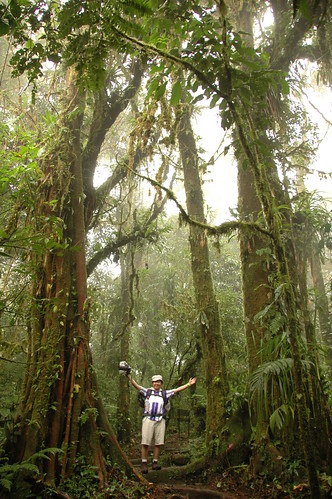
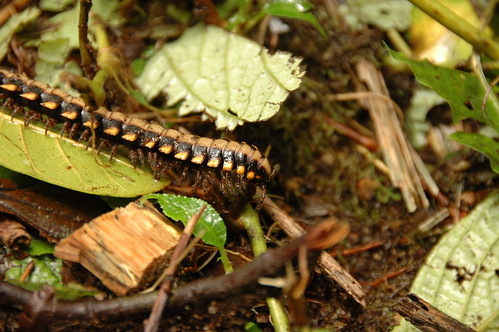
Below are a couple of pictures John shot with his D70s and my Nikkor 18-200mm in the Cloud Forest of Santa Elena. They came out quite sharp. The first was shot at 200mm f/5.6 ISO400 for 1/20 seconds. The second was shot at 18mm f/3.5 ISO400 for 1/80 seconds.

A juvenile centipede crawling on the forest floor:


A full 1:1 crop of the centipede:

Me among the trees -- John has a good eye for composition and perspectives, and it helps that a lens can do 18mm:

Sigma 24-70mm f/2.8 MACRO mode, part 2

Here are a couple of pictures I took with the extension tube behind the Sigma lens.

I cannot get the "Unlock Computer" screen up anymore than I cannot measure the actual optical field of view width.

The pen tip however is measurable. The upper left corner of the image to the tip of the pen is about 1.1 cm long. The diameter of the field of view is about 1.8 cm, definitely less than 2 cm long. The width of the optical field of view is thus about 1.5 cm. The sensor of the D80 is 2.36cm wide so this is absolutely better than 1:1 magnification!

What I learned from Costa Rica, part 4

This is about traveling with a tripod.

How do you carry your tripod around? Inside your backpack or outside? One way or another, your tripod would have to be stored inside some luggage bag for the flight because it may not be allowed to be carried as a carry-on on the plane. When you get to your destination though, how should you carry it?

In Costa Rica, I read that theft levels are on the increase. It made me uneasy to carry any camera gears on the outside of my backpack. You are just drawing attention to yourself. If they see a tripod, they might think you have more valuables on the inside of the backpack. So, my tripod was stuffed in my 60L backpack, away from prying eyes, most of the time.

Fully compressed and disassembled (the vertical column can be removed), my OPUS OT-1104BH tripod can fit in virtually any backpack. It's quite small. However, I thought it would be easier to keep the vertical column and the ball head on at all time so I can draw the tripod out of the backpack and use it instantly. My backpack contains my clothes though. It might be easy to draw the tripod out but to re-insert it back into the backpack would be challenging. My solution was to use the box the tripod came in. The box felt bulky but it works really well. The rigid structure of the box reserves space in my backpack so the tripod can easily go in and out of the box whenever I need it.

Two caveats of using the box are: it does take up probably twice as much space as the tripod itself and the double layer of cardboard materials add on more weight. However, the box keeps my clothes and everything else inside the backpack clean and dry from the dirt and sometimes water on the tripod.

How much memory is enough?

I just received an 8GB SDHC card. I was not sure if it would work with the D80. Well, it does! In addition to the current set of cards I have, I now have 17GB of SD/SDHC cards for my camera. I think I will start to record in both high-resolution JPEG and RAW formats. I have spent up a full 8GB over three cards on one vacation trip before so having an additional 8GB will make me even more generous in my shooting. Having said that, I do recognize the need to be more selective and take time to compose my pictures. So, I have 17GB of memory. My friends will not like this.

Sunday, December 14, 2008

Sigma 24-70mm f/2.8 MACRO mode

The Sigma's Macro mode is ok. A real-life ratio of 1:3.8 is not bad, but remember I still have my extension tube? It was used with both the Nikkor 50mm f/1.8 and the Vivitar 70-210mm f/3.5 for macro. The results were good. Well, I decided to run a quick test with the Sigma.

I will post the images later but I could easily magnify better than real-life ratio of 1:1. It sounds really good but the lens has to get really close to the subject, and then light becomes a big issue. My hotshoe speedlight alone might not be tall enough to hit the subject, especially when this lens is 82mm on the far end. I will have to use it as a remote or get some reflectors set up.

Friday, December 12, 2008

DSLR recommendation

A friend asked me about buying the Nikon D90. I thought I'd share my view with everyone else here. Here was the e-mail I sent:

I want to buy the D700 but it is $3000, too expensive for my needs.

The D90 would come next. I like its higher ISO performance and image processing.

On a typical day when you take the camera around, indoors and outdoors, I want to be able to shoot without flash. The higher ISO performance would be very welcoming. Compared to my D80, the D90 can shoot twice as fast and still deliver the same image quality. Having said that, sometimes, you have no choice but to use flash, to enhance light conditions and for artistic effects.

Many people will tell you the camera body is not the most important component of the camera system. True, but if the camera can capture better images for the non-professionals (e.g. better auto exposure, cleaner images, more shooting options), the better.

After you pick a camera, the next big question is what lens to use. The answer depends on how and what you want to shoot. For me, I have done:

1) A few macro photography
2) Lots of candid camera shots (need a zoom lens for this)
3) Lots of nature (not birds) shots
4) Few bird shots
5) Few portrait shots
6) Lots of baby / toddlers shots
7) Very few action shots (need a fast, big zoom lens)

Some photographers have a dedicated lens for every situation. Dedicated lens means highest quality for a specific condition. We cannot afford to do the same so I look for a good walkaround zoom lens that will cover a bit of the macro, all of the candid/nature shots, most of the portrait shots, and some of the baby shots. At the same time, I look for a lens that will give me the sharpest picture.

My walkaround Nikkor 18-200mm lens is *ok*. Not the best, even at $950 when I bought it almost two years ago; it is only $650 now. Another option is the Sigma 18-200mm. It is a tad bit slower than the Nikkor but outdoors, there is no difference. Indoors, you will appreciate the 1 extra f-stop the Nikkor gives.

After shooting with the Nikkor 18-200mm for almost two years, I find that I do use all of the range, 18mm all the way to 200mm. What you want to shoot will define the focal range you want:

Portrait: 50-70mm
Landscape: 18mm and lower (as wide as possible)
Family: 18mm-50mm
Birds: 400mm+
Candid: 18-300mm (yeah, 300mm would be great)
Sports: 70-400mm

When looking for a lens, look for one with Vibration Reduction II technology (VR) -- Canon calls it Image Stabilization (IS) and others call it differently yet. It helps with *handheld* shots tremendously. Also, the longer the focal length, the slower the lens becomes -- unless you buy a fixed aperture lens (extremely expensive).
Saturday, December 6, 2008

How reliable is my NAS ?

If you remembered, I built a RAID5 NAS using Slackware Linux 9 to store my photos online at home. I use JAlbum now to create online albums with resampled photos, but the original images stay on my NAS.

Today, I wanted to expand the storage. I had initially allocated 300GB to the logical volume. I have used over 50% of the storage volume already and before I dump anymore on it, I thought I'd expand the volume.

First some background: I have 4 x 320GB SATA drives. I use software RAID to create a RAID-5 partition and used Linux's Logical Volume Manager (LVM) to manage my volumes within the partition. I use the ext3 filesystem to store my files.

To expand the ext3 filesystem, there are three steps:
  1. Make sure you have space in the RAID Volume Group (VG).
  2. Use lvextend to extend the logical volume to whatever size that is available from the VG.
  3. Use resize2fs to resize the ext3 filesystem.
The steps are quite simple and easy, but what if during one of these steps something happens? Well, the lvextend command executed quickly and smoothly. The resize2fs was another matter. First, the resize2fs requires that the volume you are trying to resize has been fsck'ed. So, you run fsck -f on the volume. fsck was running along fine until all of a sudden I got booted out. I tried it over and over many times. Same result. That was strange I thought. As it turned out, after visiting the console, fsck requires some significant amount of memory to run. With the OS running off my RAM, there was merely 40-50MB left for any process. As fsck grows bigger and bigger during execution, the OS started to kill other processes, including the ssh instance I was logged into. Well, I decided to run fsck from the console then and it finished smoothly.

On to resize2fs. This command is a bit of a memory hog too. It was running for a while from the console until it gobbled up all memory and caused the kernel to panic and hang. Well, that could not be good. Here I had 150GB worth of files and was I about to lose all of it?

I knew I had more RAM somewhere at home so I went to an old machine and yanked out a bar of RAM. With an additional 256MB, my NAS was restarted. I re-executed resize2fs. It took its time ... did not crash ... it took more time ... still not crashing. The signs were good. It completed without any errors. It expanded the 300GB volume to about 600GB.

The ext3 filesystem has shown to me to be quite resilient to operational failure.

Potensic Atom Follow-Me Mode

The Potensic Atom's Follow-Me mode is one of its "intelligent flight" modes.  It's a really nifty feature that uses visual...