From https://www.olegkikin.com/shutterlife/nikon_d7200.htm:
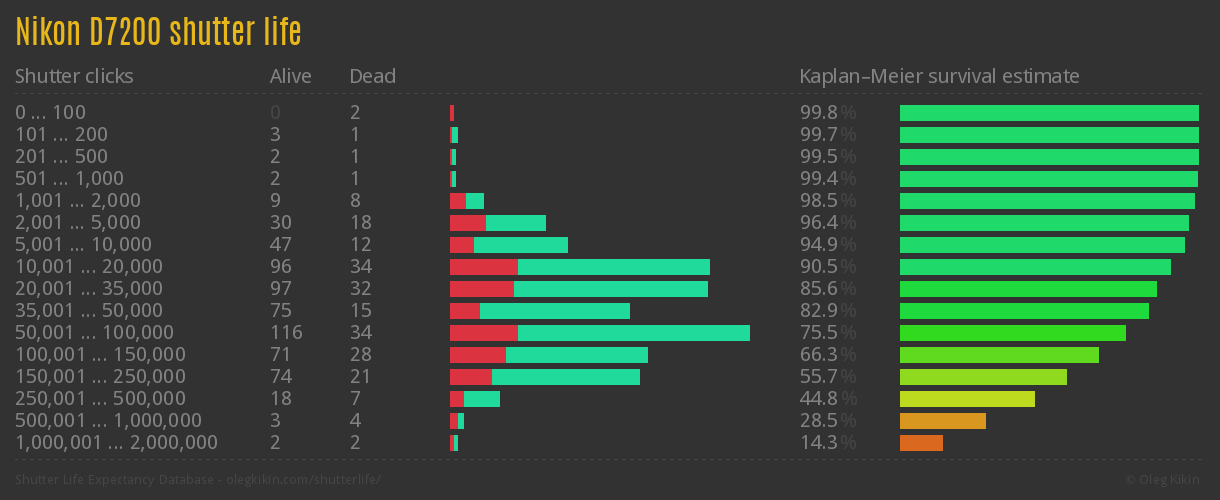
My D7200 has low shutter count so I'm expecting to be able to use it for 10 years or so.
From https://www.olegkikin.com/shutterlife/nikon_d7200.htm:
My D7200 has low shutter count so I'm expecting to be able to use it for 10 years or so.
Since I've purchased the D7200, I wanted to tell the D7000. I became curious as to how long it will keep working. The shutter count is around 86,700.
Here is a graph of actual shutter counts before a D7000 would die from https://www.olegkikin.com/shutterlife/nikon_d7000.htm:
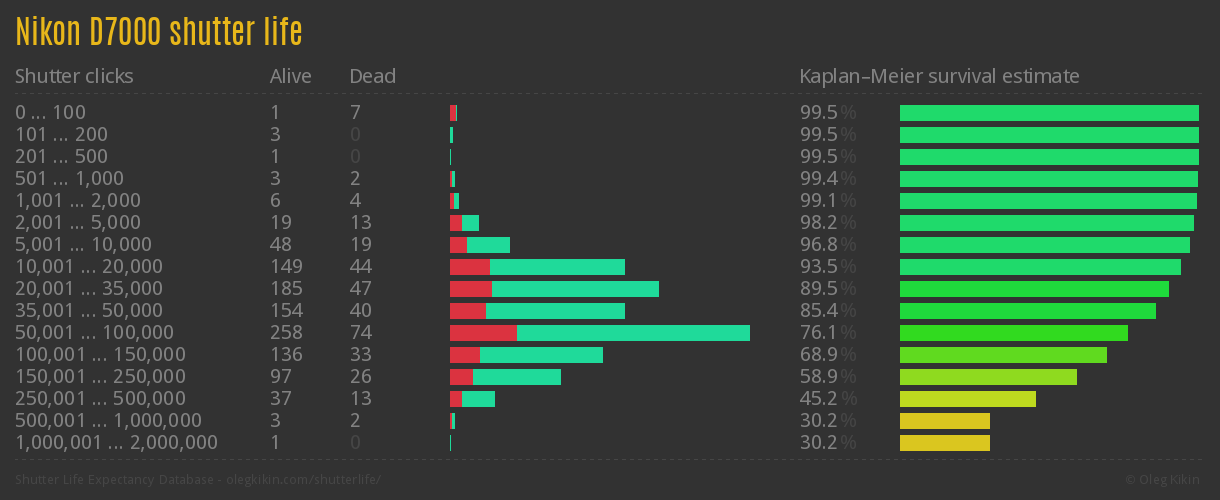
So, the survival rate seems to drop drastically after 50,000 actuations. Is my D7000 on its last leg? There are a couple of cameras still going strong after 500K actuactions! I'd be happy if mine reaches Nion's stated shutter life of 150K which appears to me like an overstatement if the estimated survival rate is only about 60%.
Recently, I purchased a second-hand Nikon D7200. My D7000 is doing quite a job and pictures are great except for the lack of HDR. While the D7000 supports Active D-Lighting, there are times I want to push the limit of its dynamic range capabilities. In fact, my phone's HDR could do a better job with image details than my D7000 in high-contrast situations! The D7200 supports HDR so I decided to go for it. I didn't want to invest $1200+ in a new camera body as I've done with the D80 and D7000 when they first came out. This time around, I decided to purchase a used one with a low shutter count. I thought I bought an excellent camera, and it is, except that it reeks of cigarette smell!
When I tested the camera, I was outside standing in the cold. My nose couldn't pick up the smell when I held the camera up to my face. It wasn't until I brought it home that I immediately realized how bad it was. My bad.

The camera is now sitting in a cardboard box with a layer of baking soda. The camera body sits on top of rails I made so it doesn't touch the baking soda. I would then close the box and tie a plastic bag over the box.
It's been 6 days. Most of the smell is now gone! The cardboard box itself was absorbing some of the smell but baking soda must also have absorbed a good chunk of it.
It's working but the camera still smells a little and I doubt leaving the camera body in the box with baking soda like that would remove the smell completely. The source of the smell is still embedded in the rubber parts of the body and there is no air movement to draw the source out so I think I will have to use a bit of elbow grease to remove it. I'm thinking to create a paste of baking soda with a bit of water and use a toothbrush or coton swab to scrub the rubber parts.
If that doesn't work, I might get activated charcoal from Amazon here: https://amzn.to/3Y6WZiq
That's for the next post.
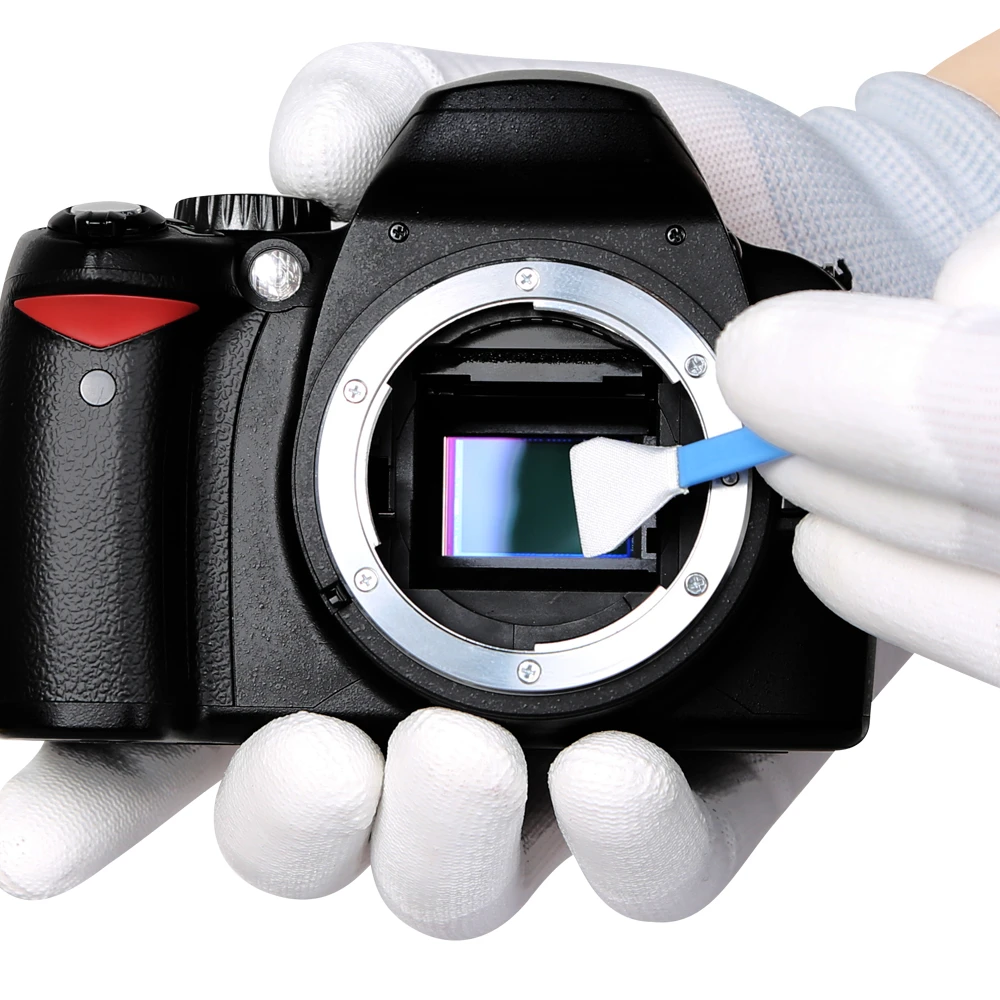
UPDATE: The paste of baking soda didn't really help to remove the smell. I ended up using some toothpaste and a toothbrush to rub over the rubber parts. It doesn't actually remove the smell but it hides most of it with the toothpaste smell! :-)While I wouldn't touch the focusing screen again, cleaning the sensor is still something I'd do on a periodic basis. If you use your DSLR on a regular basis, there is no escaping from getting dust on the sensor. (To be more specific, it's not the sensor you'd be cleaning. It's the sensor filter in front of the actual sensor and shutter.) I think it's something everyone that shoots on a regular basis need to learn to
do. Sure, you can send the camera to a shop to have it cleaned but it's really an easy and quick job. There are many good YouTube videos that show you how to do this but the tools you'd need are as follows:
For wet cleaning, you don't need to fear much about touching the sensor filter. The swabs are very soft and are lint free. Being lint free is so important--don't even think of using a cotton swab to clean your sensor!
Dust bunnies will sometimes ruin your pictures so it's important that to do regular maintenance of the sensor.
The other day, I noticed there was a spec of dust in my viewfinder of my Nikon D7000. I thought it might have been sitting on the mirror so I brushed the mirror clean, but it persisted. I thought it might have been on the bottom side of the focusing mirror so I cleaned it, but it still persisted. I wasn't sure what to do as I thought it must be inside the pentaprism box and it's always scary when you disassemble anything inside the body of the D7000! I've cleaned the sensor before so I feel confident working a DSLR but have no idea what to do with the pentaprism.
I ran across this YouTube video that was very helpful: https://www.youtube.com/watch?v=PEejMwrRoSM. The video was for the Nikon D40 but it gave me enough confidence to try the same on my D7000! It was simpler than I thought but it was at the same time tricky.

Anyways, after I managed to remove the bracket, the focusing screen would easily drop out. I handled the screen with a lint-free micro-fiber cloth and never with my fingers! You use your fingers and I can guarantee you will leave your fingerprints on it! Tips: In the video above, they have a tweezer with rubber ends. That's the best way to handle the screen.
Once you take out the focusing screen, you can use an air blower to blow away any dust that might sit on the screen. Do this in a dust-free room or you'll likely introduce more dust between the pentaprism and the focusing screen, like I did, and it will become a nightmare trying to remove more dusts out! I had to remove the focus screen 4-5 times until I gave up with cleaning it! Now I have more dust specs in the viewfinder. Gggrrr..
The moral of the story is, if it ain't broke, don't fix it! It was a tiny spec of dust--nothing to fret about and now I've got more dust in there!
#! /usr/bin/python
#
# requires flickrapi, gdata, and oauth2client
#
# It's a little ugly, but it is heavily tested and works!
#
#
#
# Sources:
# http://www.edparsons.com/2011/06/migrating-from-flickr-to-picasaweb/
# http://stackoverflow.com/questions/30474269/using-google-picasa-api-with-python
# https://github.com/MicOestergaard/picasawebuploader/blob/master/main.py
#
# http://photonfarmers.blogspot.ca/2013/02/flickr-to-picasa-web.html
#

import flickrapi, StringIO
import gdata
import gdata.data
import gdata.photos.service
from getpass import getpass
from urllib import urlretrieve
from tempfile import mkstemp
from threadpool import ThreadPool, WorkRequest
import os
import sys, os.path, StringIO
import time
import gdata.service
import gdata
import atom.service
import atom
import gdata.photos
import getopt
import webbrowser
import httplib2
args_opts, album_title_to_move = getopt.getopt(sys.argv[1], '')
print "Will copy " + album_title_to_move + "..."
from shutil import copyfile

from datetime import datetime, timedelta

from oauth2client.client import flow_from_clientsecrets
from oauth2client.file import Storage

from gdata.photos.service import GPHOTOS_INVALID_ARGUMENT, GPHOTOS_INVALID_CONTENT_TYPE, GooglePhotosException

video_too_large_save_location = os.path.join(os.path.sep.join(__file__.split(os.path.sep)[:-1]), 'picasa_videos')

if not os.path.exists(video_too_large_save_location):
    os.mkdir(video_too_large_save_location)

class VideoEntry(gdata.photos.PhotoEntry):
    pass

gdata.photos.VideoEntry = VideoEntry

def InsertVideo(self, album_or_uri, video, filename_or_handle, content_type='image/jpeg'):
    """Copy of InsertPhoto which removes protections since it *should* work"""
    try:
        assert(isinstance(video, VideoEntry))
    except AssertionError:
        raise GooglePhotosException({'status':GPHOTOS_INVALID_ARGUMENT,
            'body':'`video` must be a gdata.photos.VideoEntry instance',
            'reason':'Found %s, not PhotoEntry' % type(video)
        })
    try:
        majtype, mintype = content_type.split('/')
        #assert(mintype in SUPPORTED_UPLOAD_TYPES)
    except (ValueError, AssertionError):
        raise GooglePhotosException({'status':GPHOTOS_INVALID_CONTENT_TYPE,
            'body':'This is not a valid content type: %s' % content_type,
            'reason':'Accepted content types:'
        })
    if isinstance(filename_or_handle, (str, unicode)) and \
        os.path.exists(filename_or_handle): # it's a file name
        mediasource = gdata.MediaSource()
        mediasource.setFile(filename_or_handle, content_type)
    elif hasattr(filename_or_handle, 'read'):# it's a file-like resource
        if hasattr(filename_or_handle, 'seek'):
            filename_or_handle.seek(0) # rewind pointer to the start of the file
        # gdata.MediaSource needs the content length, so read the whole image
        file_handle = StringIO.StringIO(filename_or_handle.read())
        name = 'image'
        if hasattr(filename_or_handle, 'name'):
            name = filename_or_handle.name
        mediasource = gdata.MediaSource(file_handle, content_type,
            content_length=file_handle.len, file_name=name)
    else: #filename_or_handle is not valid
        raise GooglePhotosException({'status':GPHOTOS_INVALID_ARGUMENT,
            'body':'`filename_or_handle` must be a path name or a file-like object',
            'reason':'Found %s, not path name or object with a .read() method' % \
            type(filename_or_handle)
        })

    if isinstance(album_or_uri, (str, unicode)): # it's a uri
        feed_uri = album_or_uri
    elif hasattr(album_or_uri, 'GetFeedLink'): # it's a AlbumFeed object
        feed_uri = album_or_uri.GetFeedLink().href

    try:
        return self.Post(video, uri=feed_uri, media_source=mediasource,
            converter=None)
    except gdata.service.RequestError, e:
        raise GooglePhotosException(e.args[0])

gdata.photos.service.PhotosService.InsertVideo = InsertVideo

def clear_input_retriever(setting):
    return raw_input(setting.name + ":")

def passwd_input_retriever(setting):
    return getpass(setting.name + ':')

class Setting(object):

    def __init__(self, name, default=None, input_retriever=clear_input_retriever, empty_value=None):
        self.name = name
        self._value = default
        self.input_retriever = input_retriever
        self.empty_value = empty_value

    @property
    def value(self):
        while self._value == self.empty_value:
            self._value = self.input_retriever(self)

        return self._value


FLICKR = None

picasa_username = Setting('Picasa Username(complete email)')
picasa_username._value = ""
picasa_password = Setting('Picasa Password', input_retriever=passwd_input_retriever)
picasa_password._value = ""
picasa_oauth_client_secrets_filename = Setting('Picasa OAuth Client Secrets')
picasa_oauth_client_secrets_filename._value = 'migrate-flickr-to-picasa.secrets'

flickr_api_key = Setting('Flickr API Key')
flickr_api_key._value = ""
flickr_api_secret = Setting('Flickr API Secret')
flickr_api_secret._value = ""

flickr_usernsid = None

def flickr_token_retriever(setting):
    global FLICKR
    global flickr_usernsid
    if FLICKR is None:
        FLICKR = flickrapi.FlickrAPI(flickr_api_key.value, flickr_api_secret.value)

    (token, frob) = FLICKR.get_token_part_one(perms='write')

    if not token: raw_input("Press ENTER after you authorized this program")

    FLICKR.get_token_part_two((token, frob))

    flickr_usernsid = FLICKR.auth_checkToken(auth_token=token).find('auth').find('user').get('nsid')

    return True


def get_gd_client():

    gd_client = gdata.photos.service.PhotosService()
    gd_client.email = picasa_username.value
    gd_client.password = picasa_password.value
    gd_client.source = 'migrate-flickr-to-picasa.py'
    gd_client.ProgrammaticLogin()

    return gd_client

#
# Source:  http://stackoverflow.com/questions/30474269/using-google-picasa-api-with-python
#
def OAuth2Login(client_secrets, credential_store, email):
    scope='https://picasaweb.google.com/data/'
    user_agent='myapp'

    storage = Storage(credential_store)
    credentials = storage.get()
    if credentials is None or credentials.invalid:
        flow = flow_from_clientsecrets(client_secrets, scope=scope, redirect_uri='urn:ietf:wg:oauth:2.0:oob')
        uri = flow.step1_get_authorize_url()
        webbrowser.open(uri)
        code = raw_input('Enter the authentication code: ').strip()
        credentials = flow.step2_exchange(code)
        storage.put(credentials)

    if (credentials.token_expiry - datetime.utcnow()) < timedelta(minutes=5):
        http = httplib2.Http()
        http = credentials.authorize(http)
        credentials.refresh(http)

    gd_client = gdata.photos.service.PhotosService(source=user_agent,
                                               email=email,
                                               additional_headers={'Authorization' : 'Bearer %s' % credentials.access_token})

    return gd_client

def do_migration(threadpoolsize=7):

    print 'Authenticating with Picasa...'
    #gd_client = get_gd_client()
    gd_client = OAuth2Login(picasa_oauth_client_secrets_filename.value, 'migrate-flickr-to-picasa.store', picasa_username.value)

    print 'Authenticating with Flickr..'
    flickr_token = Setting('Flickr Token', input_retriever=flickr_token_retriever)
    token = flickr_token.value # force retrieval of authentication information...

    tmp_sets = FLICKR.photosets_getList().find('photosets').getchildren()
    sets = []
    for aset_id in range(len(tmp_sets)): # go through each flickr set
        aset = tmp_sets[aset_id]
        set_title = aset.find('title').text
        # Transfer only this one photo set ...
 if set_title == album_title_to_move:
            sets = [ aset ]
            break

    print 'Found %i sets to move over to Picasa.' % len(sets)


    def get_picasa_albums(id, aset, num_photos):
        all_picasa_albums = gd_client.GetUserFeed(user=picasa_username.value).entry
        picasa_albums = []
        id = id.strip()

        orig_id = id

        for i in range((num_photos/1000) + 1):
            if i > 0:
                id = orig_id + '-' + str(i)

            picasa_album = None

            for album in all_picasa_albums:
                if album.title.text == id:
                    picasa_album = album
                    break

            if picasa_album is not None:
                print '"%s" set already exists as an album in Picasa.' % id
            else:
                picasa_album = gd_client.InsertAlbum(title=id, summary=aset.find('description').text, access='protected')
                print 'Created picasa album "%s".' % picasa_album.title.text

            picasa_albums.append(picasa_album)

        return picasa_albums


    def get_picasa_photos(picasa_albums):
        photos = []

        for album in picasa_albums:
            photos.extend(gd_client.GetFeed(album.GetFeedLink().href).entry)

        return photos

    def get_photo_url(photo):
        if photo.get('media') == 'video':
            return "http://www.flickr.com/photos/%s/%s/play/orig/%s" % (flickr_usernsid, photo.get('id'), photo.get('originalsecret'))
        else:
            return photo.get('url_o')


    def move_photo(flickr_photo, picasa_album):

        def download_callback(count, blocksize, totalsize):

            download_stat_print = set((0.0, .25, .5, 1.0))
            downloaded = float(count*blocksize)
            res = int((downloaded/totalsize)*100.0)

            for st in download_stat_print:
                dl = totalsize*st
                diff = downloaded - dl
                if diff >= -(blocksize/2) and diff <= (blocksize/2):
                    downloaded_so_far = float(count*blocksize)/1024.0/1024.0
                    total_size_in_mb = float(totalsize)/1024.0/1024.0
                    print "photo: %s, album: %s --- %i%% - %.1f/%.1fmb" % (flickr_photo.get('title'), picasa_album.title.text, res, downloaded_so_far, total_size_in_mb)

        dest = os.path.join(video_too_large_save_location, flickr_photo.get('title'))
        if os.path.exists(dest):
            print 'Video "%s" of "%s" already exists in download cache of files over 100MB. Aborting download.' % (flickr_photo.get('title'), picasa_album.title.text)
            return

        photo_url = get_photo_url(flickr_photo)
        print 'Downloading photo "%s" at url "%s".' % (flickr_photo.get('title'), photo_url)
        (fd, filename) = tmp_file = mkstemp()
        (filename, headers) = urlretrieve(photo_url, filename, download_callback)
        print 'Download Finished of %s for album %s at %s.' % (flickr_photo.get('title'), picasa_album.title.text, photo_url)

        size = os.stat(filename)[6]
        if size >= 100*1024*1024:
            print 'File "%s" of set "%s" larger than 100mb. Moving to download directory for manual handling. ' % (flickr_photo.get('title'), picasa_album.title.text)
            copyfile(filename, dest)
            os.close(fd)
            os.remove(filename)
            return

        print 'Uploading photo %s of album %s to Picasa.' % (flickr_photo.get('title'), picasa_album.title.text)

        if flickr_photo.get('media') == 'photo':
            picasa_photo = gdata.photos.PhotoEntry()
        else:
            picasa_photo = VideoEntry()

        picasa_photo.title = atom.Title(text=flickr_photo.get('title'))
        picasa_photo.summary = atom.Summary(text=flickr_photo.get('description'), summary_type='text')
        photo_info = FLICKR.photos_getInfo(photo_id=flickr_photo.get('id')).find('photo')
        picasa_photo.media.keywords = gdata.media.Keywords()
        picasa_photo.media.keywords.text = ', '.join([t.get('raw') for t in photo_info.find('tags').getchildren()])
        picasa_photo.summary.text = photo_info.find('description').text

        if flickr_photo.get('media') == 'photo':
            gd_client.InsertPhoto(picasa_album, picasa_photo, filename, content_type=headers.get('content-type', 'image/jpeg'))
        else:
            gd_client.InsertVideo(picasa_album, picasa_photo, filename, content_type=headers.get('content-type', 'video/avi'))

        print 'Upload Finished of %s for album %s.' % (flickr_photo.get('title'), picasa_album.title.text)

        os.close(fd)
        os.remove(filename)


    threadpool = ThreadPool(threadpoolsize)

    for aset_id in range(len(sets)): # go through each flickr set
        aset = sets[aset_id]
        set_title = aset.find('title').text
        print 'Moving "%s" set over to a picasa album. %i/%i' % (set_title, aset_id + 1, len(sets))

        print 'Gathering set "%s" information.' % set_title

        num_photos = int(aset.get('photos')) + int(aset.get('videos'))
        all_photos = []

        page = 1
        while len(all_photos) < num_photos:
            all_photos.extend(
                FLICKR.photosets_getPhotos(
                    photoset_id=aset.get('id'),
                    per_page=500,
                    extras="url_o,media,original_format",
                    page=page,
                    media='all'
                ).find('photoset').getchildren()
            )
            page += 1

        print 'Found %i photos and videos in the %s flickr set.' % (num_photos, set_title)

        picasa_albums = get_picasa_albums(set_title, aset, len(all_photos))
        picasa_photos = get_picasa_photos(picasa_albums)

        for photo_id in range(len(all_photos)):

            photo = all_photos[photo_id]
            photo_found = False

            for p_photo in picasa_photos:
                if p_photo.title.text == photo.get('title'):
                    print 'Already have photo "%s", skipping' % photo.get('title')
                    photo_found = True
                    break

            if photo_found:
                continue
            else:
                print 'Queuing photo %i/%i, %s of album %s for moving.' % (photo_id + 1, len(all_photos), photo.get('title'), set_title)

            p_album = None
            for album in picasa_albums:
                if int(album.numphotosremaining.text) > 0:
                    album.numphotosremaining.text = str(int(album.numphotosremaining.text) - 1)
                    p_album = album
                    break

            req = WorkRequest(move_photo, [photo, p_album], {})
            threadpool.putRequest(req)


    threadpool.wait()


if __name__ == "__main__":

    print """
    This script will move all the photos and sets from flickr over to picasa.
    That will require getting authentication information from both services...
    """

    do_migration()
The Potensic Atom's Follow-Me mode is one of its "intelligent flight" modes. It's a really nifty feature that uses visual...